

What Is New Around Kipas eFootball
The newest talk in the kipas football scene is about season-style updates: refreshed squads, current kits, and menus styled on the latest eFootball season. Community posts present these builds as a full update package for Android, with Dream Team, divisions, friendly matches, and a transfer market shown in screenshots.
Read those claims the way a careful fan should. The base game moves in seasons set by KONAMI, while community builds follow their own calendar. A screenshot of a new menu proves a menu exists, not that every mode behind it works. This guide separates the two every time: what the official game does, and what a Kipas eFootball build claims to do.
What Is Kipas eFootball?
Kipas eFootball is the name fans use for an unofficial, fan-made modified version of eFootball, the free-to-play football game developed and published by KONAMI. It is not a separate official app, it has no store listing of its own, and it is not made or endorsed by KONAMI.
The name travels through community channels, fan groups, and video posts, mostly in Indonesia, where modifying football games has been a fan habit since the PES years. Kipas football builds are usually presented as a ready-made package: install the file, open a familiar eFootball-style menu, and play with updated teams and presentation.
That is the honest starting point for everything on this page. Kipas eFootball exists as a community scene, not as a product with a publisher, a support desk, or a verified version history. The sections below cover the features fans look for, the offline question, the real risks, and how to think about downloading anything that carries this name.
How Kipas Football Fits Around eFootball
Every Kipas eFootball build starts from the same base: KONAMI eFootball, the game that grew out of the Pro Evolution Soccer series. The official game is free to play, built around Dream Team squad building, league divisions, events, and weekly updates that follow real football.
A fan mod sits on top of that base and changes what it can reach locally: menus, kits, squad data, presentation, and sometimes mode settings. What a local file cannot change is anything stored on KONAMI servers, such as account progress, currency balances, and online records. When a community post shows huge currency numbers, those numbers live only inside that modified build and mean nothing on an official account.
Understanding that split explains most of the scene. Local changes are easy to show in a screenshot. Server-side features are the ones that fail, disconnect, or carry account risk when a modified client tries to use them.
Main Features Fans Look For
- Season-style squads and kits. Updated rosters and current-season kits are the first thing fans check in any kipas football release.
- Dream Team presentation. Community screenshots show the familiar squad-building mode, with signed players and team management screens.
- Division and friendly matches. Promotional posts advertise competitive divisions and one-off friendly matches against other players or the AI.
- Transfer market screens. A market-style interface for moving players is part of the advertised package in recent community material.
- My League against the AI. A season mode against computer clubs is the feature offline fans ask about most.
- Co-op matches. Shared team play appears in community feature lists, matching a mode the official game also offers.
- Familiar eFootball menus. The interface copies the official layout closely, which is why screenshots can look identical to the real game at a glance.
Each feature above is something the scene advertises or shows. None of them has been independently verified to work reliably or safely, and this guide will keep saying so wherever it matters.
Game Screenshots
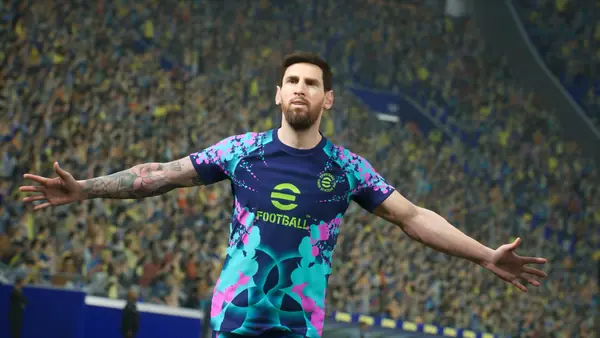
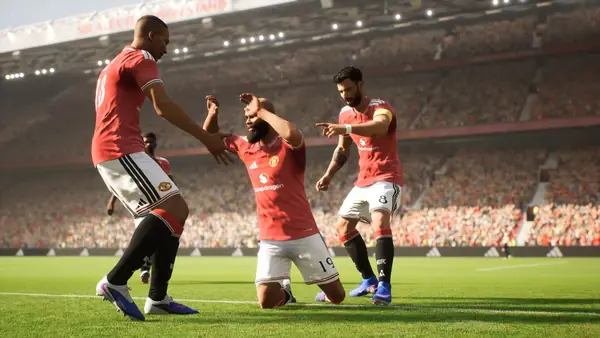
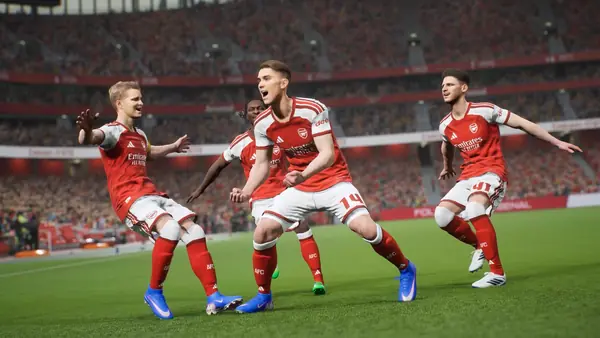
These are real screenshots of eFootball, the official base game by KONAMI, shown so you can compare them with the menus community builds display. They are game screenshots, not phone captures of a Kipas build, because no verified Kipas eFootball phone build exists to photograph.



Safety and Verification
Safety is the section that decides whether Kipas eFootball belongs on your phone at all, so it stays blunt. No Kipas build has been audited by any app store. No publisher stands behind the files. Community installers can ask for extra downloads after the first install, which means the first file size you see is not the full picture.
The account risk is separate from the file risk. KONAMI has stated that using modified versions of its software breaks the eFootball terms of service, and the stated penalties include temporary or permanent account suspension. Never sign in with a valued account inside a modified client, and never type an official password into one.
Our checks on any football file follow the same routine described on the review page for this site: confirm the source, compare the file details against anything verifiable, install only on a test phone, and watch what the app asks for. A build that fails any of those steps does not get a download button here.
How to Download and Install
There is no download file linked on this site yet, so these steps describe the careful order to follow if you ever install a community football build from anywhere, written for Android phones.
- Start with space and backup. Football games are large. Free up several gigabytes, back up anything you care about, and charge the phone.
- Check the file details first. Note the file name and size before you tap anything. If a page shows a different size after the tap, stop.
- Install on a spare device if you can. A test phone keeps your main account, photos, and messages away from an unverified file.
- Watch the permission prompts. A football game needs storage and network access. It does not need your contacts, messages, or accessibility control.
- Never sign in with your main account. Treat any login screen inside a modified client as a risk, not a formality.
- Open offline features first. If a build claims local modes, test those before touching anything that connects to a server.
How to Update
Community builds do not update like store apps. There is no automatic update channel for a Kipas eFootball file, so a new community release usually means a fresh install of a new file, with the same checks repeated from the start.
The official eFootball game updates through its normal store channel in seasons and smaller patches. If you play both, keep them separate: an official update never updates a fan build, and a fan build should never be installed over the official game if you value the account signed into it.
Device Compatibility
The official eFootball game runs on Android phones and tablets and asks for roughly 2.9 GB of free storage for its own install, before extra data. Recent store information points to modern Android versions, so an older phone that struggles with the official game will struggle more with an unverified build.
For a smooth match, aim for a phone with at least 4 GB of RAM, a recent mid-range chip or better, and stable storage space beyond the install size. Tablets give a bigger view of the pitch, and a Bluetooth controller supported by the official game can make matches easier to control.
Technical Details
The verified technical facts belong to the base game. eFootball is developed by KONAMI, uses the package name jp.konami.pesam on Android, is free to play with optional purchases, carries an Everyone content rating, and stores account progress on KONAMI servers rather than only on the phone.
For Kipas eFootball itself there is no package name, signature, or version record that any public listing verifies. Community posts describe installer files of very different sizes, and extra data downloads after install are part of the reports. Any site that prints one exact size or version for the Kipas mod as settled fact is guessing, and this page will not copy the guess.
Why Fans Download It
The appeal is easy to understand. Fans in Indonesia grew up modifying PES, and kipas football continues that habit on phones: current squads without waiting, local football flavour the official game does not carry, and the feeling of a fresh season in one package.
The offline hope is part of the pull too. The phrase kipas efootball Offline trends because players want matches on the bus, at school, or anywhere a connection drops. Whether any given build truly plays offline is exactly the claim that reports disagree on, which is why the guides on this site treat it as a question to test, not a promise to repeat.
Pros and Cons
Pros
- Season-style squads, kits, and presentation in one community package
- Built around a free, familiar football game that millions already play
- Strong community support culture, with fan help easy to find
- Offline mode claims that, where they work, suit travel and low-signal play
Cons
- Unofficial and unaudited, with no publisher or support desk
- Real account suspension risk under the base game terms
- Advertised online modes and currency are not verified and cannot transfer to an official account
- No verified version, size, or package record anywhere
Old Versions
There is no verified archive of older Kipas eFootball builds. Community posts reuse names across seasons, the same label can point to different files, and nothing like a store version history exists to check one release against another.
That is why this page lists no old version numbers. If a download page elsewhere offers a neat list of dated Kipas versions with exact sizes, treat the list as marketing, not records. The official eFootball game, by contrast, has a real version history through its store listing.
Alternatives Worth Knowing
- Official eFootball by KONAMI. The safe route: the same base game, full online modes, and an account that stays yours.
- EA Sports FC Mobile. A licensed mobile football game with its own squad-building and live events.
- Dream League Soccer. A lighter football game known for club building and offline-friendly play.
- Score! Hero and similar small football games. For short sessions on phones that cannot carry a full match engine.
Troubleshooting Common Problems
The file will not install. The usual causes are low storage, a blocked unknown-source install, or a file that does not match your Android version. Free space first, then check the file details again before retrying.
The game asks for more downloads. Reports describe extra data arriving after the first install of community builds. Decide in advance how much data you accept, and stop if the total grows past it.
Online modes fail or disconnect. A modified client talking to official servers is the most fragile setup in this scene. That failure is expected behaviour, not a bug you can fix with settings.
An account warning appears. Stop using the modified client with that account. The warning is the mild version of the penalty the terms describe.